


Editor's review
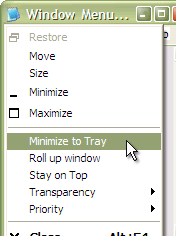
Actual Windows Menu is a suite of the most essential tools for versatile windows control such as minimize them to tray, set up priority, keep always-on-top, apply transparency, etc. Once installed, the extra options are added to each window`s system menu.
Features: Actual Window Menu is a collection of tools letting users do advanced windows operations on the desktop. Several additional things that can be done with the windows created by applications are minimize to Windows notification area (system tray) or to a floating icon on the screen, alter the execution priority of Windows processes on-the-fly, apply semi-transparency effect, roll up/unroll, resize, align, easily move windows between different displays in a multiple display environment, etc. These new features allow advanced and newbie Windows users save their time and desktop space by neatly organizing windows. On installation, the application embeds these extra commands into the Windows system menu.
These new commands are as easy to use as common Move/Size/Minimize/Close ones, and they significantly enhance windows management abilities. The set of commands can be customized for particular applications so that you can select just features which are really necessary there and, thus, form a convenient and flexible working environment. Unlike simple shell extension solutions, this utility allows you to create rules for each individual application which is most convenient for automating the organization process. This can be very handy when you have to work with numerous applications at once switching from one to another. Simply find the window you would like to configure and use straightforward interface to configure its extended menu and its settings. Hotkey support is available. You can use these sophistication to any application such as email clients, Office tools and other programs. It is a multilingual tool and is available in English, German, French, Spanish, Russian, Ukrainian, Japanese, simplified and traditional Chinese.
Overall: Very useful when you are working with multiple applications.
User comments