


Editor's review
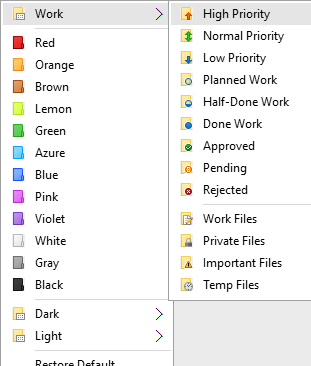
Enables you to quickly change folder color or mark folders to indicate priority (high, normal, low), project completeness level (done, half-done, planned), work status (approved, rejected, pending) and type of information stored in folder.
Features: Folder Marker Home is a helper utility specially designed for home work. It let you change the color of the folders in the explorer display. The color used can follow a coding standard of your own. Colors can be used to indicate priority levels, work completeness level or work status such as if it is approved, rejected or pending. You could even code them to indicate the kind of information in the folders such as work data, project data, private/personal data and so on. Folder Marker Home lets you mark your folders with color-coded and image-coded icons with one mouse click, which makes them easy to find and retrieve. Simply select the folder you want to mark, right-click on its icon, select a color-coded icon from the drop-down menu and it will be assigned to the folder at once. There are some 36 built-in icons with normal, dark and light colors.
It is highly customizable. Right click menu can be modified and new menu items added and category and icons can be assigned. If you`d like you can add your own icon set to the collection of the program. A suitable ICL file can be dropped into the appropriate folder and you are done. The icon(s0 will appear under a new tab. These can be made distributable too. A color-coded icon remains unchanged even if the folder is copied onto a new computer or the system has been re-installed.
Overall: Could be useful if you deal with a variety of files that are needed for a range of projects that you handle. Unless it is used religiously your folders icons can get messed up.
User comments