
 |
 |
|
|
 |
 |
 |
 |
|
|
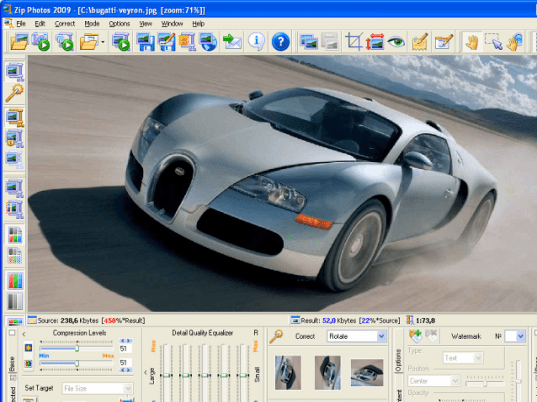
Zip Photos specializes in compressing digital images because this special type of files cannot be well compressed by usual file compression utilities. Zip Photos, based on our Advanced JPEG Compressor technology is able to well compress images in many source graphic formats. Zip Photos makes JPEG image files and can use WinZip create ZIP archive files. Zip Photos works as a standalone application as well as an add-on to WinZip. The another important feature of Zip Photos is ability to edit photos preserving their original quality. Zip Photos contains our most advanced JPEG compression engine and technology specially designed to preserve the original picture quality of your digital photos. You can use Zip Photos to edit photos, resize, crop, remove red eyes, add text and watermarks, and more. Zip Photos the solution for anyone wanting to edit or compress photos and preserve their quality. Zip Photos offers you the ability to create and save 'profiles'. You can use a profile to process one or multiple photos (batch processing) just in several clicks. Use Zip Photos to get your photos ready for the Web: edit, resize, make thumbnail pictures, shrink the large file size of your graphic files, optimize pictures for faster loading from the Web, e-mail smaller image files quickly and not exceeding email size limitations. Digital camera users will benefit most from the new outstanding abilities offered by Zip Photos.
|
|
Editor review: Reviewer, 2009-10-19 07:30:00
Digital images can not be well compressed by file compression utilities but using Zip Photos for WinZip you can compress your digital image files. Zip Photos for WinZip is a standalone application as well as add-on to WinZip. It supports all major type of image formats. After compression also the original quality of images are preserved using most advanced, hi-end algorithms and technology.
Features: Application user interface is nicely designed. Application allows you to perform all the editing operation on your image file. You can resize, crop, set brightness and contrast and many more. You can perform compression for single file or use batch compression option.
In batch compression option, select the files which you would like to compress. Batch option dialog box is opened to specify the settings. Specify destination folder where you would like to store the file. Specify prefix or suffix to the resulting file name. You can choose profile from the available list, selected profile will be used for processing selected images. Application allows you to select one of four available user interface modes for batch processing. Available modes are No user interaction, display an animated progress window, No user interaction, work in the background mode, No user interaction, minimize the main window while processing and User-interface mode, individual image processing. As per option selected application will perform compression of selected files.
Overall: This is a very good compression utility to compress image files.
|
 |
 |
Visit homepage of Zip Photos for WinZip
Download Zip Photos for WinZip 2009
Popular search terms related to Zip Photos for WinZip:
winzip, digital camera, digital photos, compress, profiles, resize, optimize, camera, thumbnail, archive
|

compression and zip file utilities picture compress how to edit jpeg file shrink photos jpeg file compressor jpeg compressor jpeg compress edit jpeg text best file compressor file compressor

Programs related to Zip Photos for WinZip
|