
Free Downloads Center
e.g. RVL Drive Scanner 1.3

Top in this section

R-Studio

Data recovery tool for FAT, NTFS, Ext2FS file systems. File recovery after FDISK, MBR destruction, FAT damaged, virus infection. Dynamic disk support. Damaged RAID reconstruction.

Latest Reviews

Free Address Book 1.2

Free Address Book 1.2
Free Address Book, an advanced tool that will store and organize your addresses, phone numbers, mobile, fax, and so on of your contacts and partners.

Anyplace Control

Anyplace Control
Anyplace Control is a multi-functional remote PC access software to remotely access and control any PC via LAN or Internet.

Subscribe

RVL Drive Scanner 1.3 Download

Editor's rating  
Users' rating   (1 votes) Rate it!
License Freeware / $0.00
Downloads 429
Publisher RVL Soft
File size 432K
Date added 29-May-2009
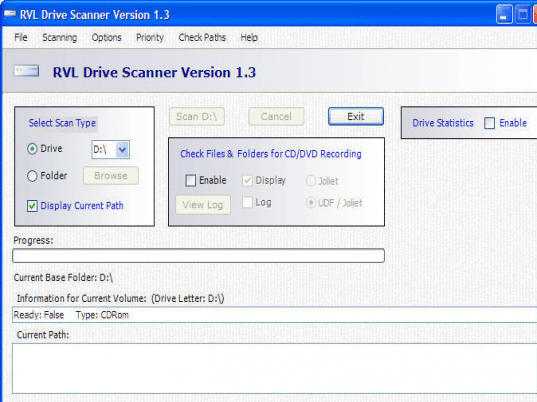
RVL Drive Scanner screenshot

Enlarge screenshot

Publisher's description
Editor's review
Submit your review

With RVL Drive Scanner, you can scan drives or folders. And in addition to determining the total number of folders and files in a particular drive or folder, the application also displays the number of normal, hidden, and system files and folders. This display and the display of the current path can be turned off if you are only interested in checking paths for CD or DVD recording. This speeds up operation considerably.

This program provides additional useful functionality in that it can scan for paths that will not be recordable on CDROM or DVDROM. Checking is provided for the two most popular recording formats in use today: Joliet and UDF (Universal Disc Format) with Joliet bridge.

Editor review: Reviewer, 2009-06-08 07:33:00

RVL Drive Scanner is a freeware program which can be used to scan drive and folders.

Features: With RVL Drive Scanner you can find out what`s available on a drive and folders. It will determine and display the total number of folders and files in a particular drive or a folder. It also shows you the number of normal, hidden, and system files and folders. This display and the display of the current path can be turned off. This set up is for determining if paths are ok for CD or DVD recording. If you are working with only CD/DVD recording the program can get speeded up considerably. This program provides additional useful functionality in that it can scan for paths that will not be recordable on CDROM or DVDROM. Checking is provided for the two most popular recording formats in use Joliet and UDF (Universal Disc Format) with Joliet bridge.

The interface is simple. You can choose if you are scanning for a drive or a folder. Click on the scan button starts the scanning process. Enabling drive statistics displays details of scan results. A summary of statistics is available anyway. This tells you drive type, file system, total space, free space etc. Current path being scanned is displayed when scanning is going on. A progress bar shows you how the scanning is progressing.

Overall: This is like many other drive scanners available. Many such programs give you visual representation. This one does not have that functionality.

Visit homepage of RVL Drive Scanner

Download RVL Drive Scanner 1.3


dvd udf
any format to dvd
all format to dvd
all files to dvd
dvd to one
every dvd
keep dvd
dvd any
any to dvd
dvd format

Programs related to RVL Drive Scanner

Copyright © 2001-2009, Free Downloads Center.