
 |
 |
|
|
 |
 |
 |
 |
|
|
Files Search Assistant provides quick and efficient search within text documents.
With Files Search Assistant you can search text in different file formats, for example in Adobe Acrobat (PDF) documents, MS Office files (xls, doc). Preview pane and other options make your search efficient and rapid.
Preview Pane - was design to save user form routine job. You can search for some text within different documents and Files Search Assistant can:
- Show you a small piece of found file with your keyword (marked as a bold text);
- Generate report with your search results, which you can print or save to file;
- Copy or move your search results to another folder;
- Help to navigate through your search result in a handy manner;
There are some features, which make Files Search Assistant especially useful for anyone who works with different documents (different formats and different context). Files Search Assistant provides you with:
- Custom Search options, where you can setup your preferable search settings, such as folders to search in and files to search for;
- Custom File Masks, where you can specify types of files, which you usually search for;
Some functions make Files Search Assistant an irreplaceable tool on your desktop. It allows:
- Search over network;
- To do sub search in zip files;
- Perform search within results;
- Search by data and by file size;
- To do multi-directories search;
- Search in different file formats (includes Acrobat Reader and MS Office documents);
- Generate search reports;
Why buy Files Search Assistant.
The only reason to buy this software is time saving. It means that you can work more efficiently, to be more creative and to convert your data into knowledge, which you can use to get profit.
Searching for lost and missing files with Files Search Assistant is now easy!
|
|
Editor review: Reviewer, 2009-11-23 12:18:00
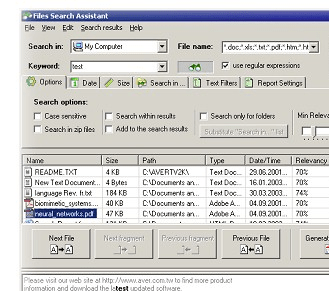
Files Search Assistant is a very useful utility to search text in different file formats. Application allows you to refine your search criteria to perform quick search. The result is displayed with previous and next line of the text found. The keyword text is highlighted with a different color. Application also has a feature to export search report.
Features: The application has a very nice user interface, you can perform all the settings and operations from a single user screen.
You need to perform setting to search for the text. Define search path from where you would like to search specified keyword. Enter the keyword to search; you can also use regular expression for keyword. Select the file type in which you would like to search the word, you can select specific file type or select all files. Application allows you to set search options such as case sensitive, search in result, search in zip file, append search result etc. With date option you can specify date range for search. Text filter option allows you to select the file type as open office, RTF, multimedia, picture, PowerPoint, PDF, MS office files, HTML etc. Once all the settings are done click on search button to start searching. The result is displayed with file details like name, path, size, type, modified etc. You can export your search result in HTM or RTF format.
Overall: This is a very good and extremely useful utility to every computer user to find out the specified keyword in any file easily and quickly.
|
 |
 |
Visit homepage of Files Search Assistant
Download Files Search Assistant 3.1
Popular search terms related to Files Search Assistant:
adobe acrobat reader, acrobat reader, xls, adobe acrobat, acrobat, doc, adobe, reader, pdf, quick time
|

adobe creative doc reader convert pdf into xls convert pdf to xls convert xls to pdf works doc convert to zip convert doc to xls convert doc files to pdf files doc convert pdf

Programs related to Files Search Assistant
|