


Editor's review
While carrying out your routine works on your PC, often you might have experienced hassles like slow functioning, low disk space and myriad other problems. Quite expectedly such situations result in frustration as the applications, windows, and files might take an endlessly long time to open. This may cause delay in your work and lower the efficiency. But, now, it’s easy to prevent such circumstances by opting out an effective solution, for which you need not do much but try out FCleaner 1.0.5.1205. It displays remarkable proficiency in cleaning and optimizing your Windows system. The program detects and removes the non-required files from the system that uselessly occupy the disk space and slow down your PC’s performance. It cleans Internet History, Cookies, Recycle Bin, Windows Memory Dumps, Windows Log File, Internet Cache, Typed URLs, etc, and unused application files from programs such as Windows Media Player, Sound Forge, Office 2007, etc.
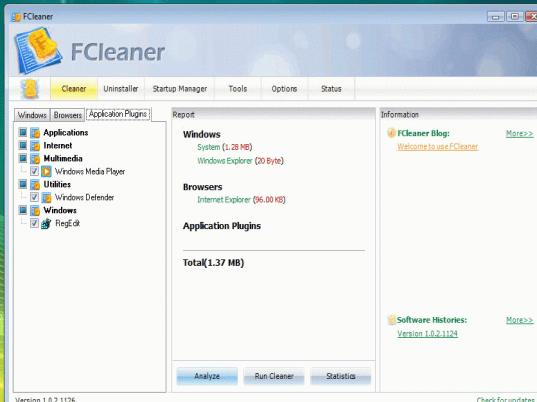
On launch the FCleaner 1.0.5.1205 opens with an attractive graphical user interface, which integrates different features in it. Clicking on ‘Cleaner’, the application presents Windows, Browsers and Application Plugins, options which present different types of unwanted files that you can choose to clean. To begin the cleaning process you need to mark the files like RegEdit, Windows Defender, Cache, Cookies, Saved PassWord, Clipboard, Recent Documents, Chkdsk File Fragments, ZoneAlarm (Logs), Media Player Classic, Menu Order Cache, and many others. The right side area of the screen display report containing the size and occupied space details. You can even view the ‘Statistics’ and ‘Analyze’ the file details. When you have completed the file selection, you simply need to press ‘Run Cleaner’ and the application would begin the cleaning process. Further, you’re provided with ‘Uninstaller’ to uninstall, update and repair softwares, and ‘Startup Manager’ for enabling and disabling applications that run with Windows startup. In addition to these, there’s Tools, Options and Status features presented by the program.
The FCleaner 1.0.5.1205 facilitates users with the capability to clean your system’s non-required files, thus, optimizing its performance. Taking into consideration, the immaculate feature-set that supports its flawless performance, the application assigned 4 rating points.
User comments