
Free Downloads Center
e.g. A-PDF Restrictions Remover 1.6.5

Latest Reviews

Animated Wallpaper Maker

Animated Wallpaper Maker
Add life to your desktop, decorate it with self created animation wallpapers with the help of Animated Wallpaper Maker.

Pimero Free Edition

Pimero Free Edition
Pimero Free Edition, perfect for private use this program will manage and organize all your personal information, appointments, emails, contacts, tasks and notes.

Subscribe

A-PDF Restrictions Remover 1.6.5 Download

Editor's rating  
Users' rating   (8 votes) Rate it!
License Shareware / $9.99
Downloads 29542
Publisher A-PDF.com
File size 1524K
Date added 11-Nov-2009
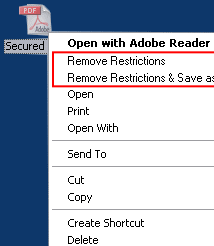
A-PDF Restrictions Remover screenshot

Enlarge screenshot

Publisher's description
Editor's review
Users' reviews (4)
Submit your review

Do you have a PDF (Adobe Acrobat) file which cannot be printed, copied, or edited? Your PDF file has had password security and other restrictions added.With A-PDF Restrictions Remover, you can remove the password and restrictions in a few seconds.

A-PDF Restrict Remover is extremely easy to use. Just right click the PDF file in Windows Explorer, and in the context-sensitive menu that pops up, select either the "Remove Restrictions" or "Remove Restrictions & Save as..." option. In just a few seconds, you will have a PDF file with no restrictions. You can edit, print, copy, and more with your PDF files.

It also support password pool to let you do not repeate to input passwords.

FREE 15 day trial and only $9.99.

Editor review: Reviewer, 2009-11-12 09:38:00

When you get PDF file having restriction for printing, copying and editing, then you need to get the password or try cracking password or start writing new document, all these are time consuming activities and not advisable options. Using A-PDF Restrictions Remover you can remove restrictions very easily.

Features: Application has very simple user interface but rich functionality. Anyone can easily and effectively use this utility; it doesn`t require any computer expertise. Application allows setting options like General and Password Pool. With General option you can set an option as Backup file on remove restriction, append .BAK to existing extension or backup to the specified directory. If you face any difficulty or are unable to see context-sensitive menu in Windows explore click on create context-sensitive menu button to recreate the menu. It also support password pool to let you do not repeat input passwords.

You can perform PDF restriction removal task in on of two ways. One is from the user interface and another from context-sensitive mode. Select the PDF file from windows explorer from which you want to remove restriction. Right-clicking on it, Windows Explorer brings up a context-sensitive menu with options as "Remove restrict", "remove restrict & save as" along with other standard options. If you have selected remove restriction, it will remove the PDF file restrictions quickly and if you select Remove restriction and save as, it will remove PDF file restriction and save the document as another PDF file at specified location.

Overall: This is a very good utility to easily remove restriction from your PDF file.

Visit homepage of A-PDF Restrictions Remover

Download A-PDF Restrictions Remover 1.6.5


compress pdf file
folder pdf
pdf album
text remover
pdf tools
pdf to dvd
searchable pdf
read pdf files
foxpro to pdf
pdf info

Programs related to A-PDF Restrictions Remover

Copyright © 2001-2009, Free Downloads Center.