
Free Downloads Center
e.g. Windows File Recovery 4.03

Latest Reviews

Ainvo Registry Defrag

Ainvo Registry Defrag
Ainvo Registry Defrag is a simple tool with the capability to keep your system working in a smooth and stable condition.

VintaSoftTwain.NET Library

VintaSoftTwain.NET Library
VintaSoftTwain.NET Library is a handy and useful .NET library with which you can control the working of scanners, cameras and any other TWAIN devices.

Subscribe

Windows File Recovery 4.03 Download

Editor's rating  
Users' rating   (1 votes) Rate it!
License Shareware / $69
Downloads 194
Publisher Data Recovery
File size 1925KB
Date added 1-Aug-2009
Windows File Recovery screenshot

Enlarge screenshot

Publisher's description
Editor's review
Submit your review

Kernel for windows recovery tool recovers lost or deleted or corrupted files and folders from FAT and NTFS file system based partitions. Effective windows file recovery is made possible with easy to use Kernel for Windows software. Software recovers data from corrupt, damaged or deleted FAT & NTFS based partitions, missing partitions, reformatted partitions. Hence the users have a sigh of relief. Other reasons for data corruption could be virus attacks, OS corruption, windows registry corruptions. Windows data recovery software is embedded with two distinguished Standard Scan and Advance Scan options for retrieving the inaccessible partitions. It thoroughly performs recursive scanning of the found FAT and NTFS partitions, hence restores the corrupted data, displaying in a hierarchical manner. Download the demo version and get preview of the recovered data. You can save them at the desired location after purchasing the Full version of windows recovery software. File Systems FAT and NTFS installed on Windows 7, Vista, XP, 2008 server, 2003 server, 2000, NT, ME, 98, 95, and MS DOS are supported by Kernel for Windows data recovery software.

Editor review: Reviewer, 2009-11-23 12:48:00

Windows File Recovery recovers Windows files. The application is useful to recover lost files because of hard drive failure, virus attack etc. It recovers missing files(s) and folder(s). This utility is support for IDE, EIDE, SCSI and SATA, PAN, ZIP drives.

Features: Hard drives crash because of many reasons. Hard drive failure causes NTFS or FAT file system to crash and you lose data on your hard disk. With the help of Windows File Recovery you can recover all files and documents without knowing about file systems, partitions, FAT or NTFS volumes.

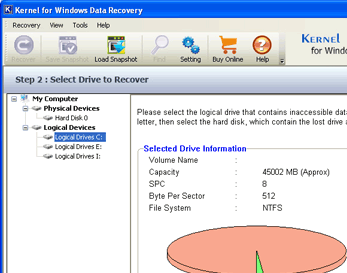
You need to follow three simple steps to recover lost or damaged file. On the first screen you can see the information of your drive like model, capacity, cylinder, head and sector per track. Select scan type as standard scan or advance scan. In the next step, select the partition to recover from the left pane of screen or you can search for the missing partition. You can view the information of partition type, partition start, end and size. Moving to the next step, program starts searching the data of the selected partition, you can see the progress on screen. Once the process is completed it will display the data. Select the file(s) and folder(s) to recover from the right pane of application. You can open a file by double clicking so see the content before recovery. Click on “recover selected” option to recover selected files. Application also provides setting options for sector to read in single attempt, setting of duplicate files, setting for deleted files and settings for bad sectors.

Overall: This is a nice utility to recover lost data from hard disk.

Visit homepage of Windows File Recovery

Download Windows File Recovery 4.03


dos file recovery
ntfs for dos
fat file recovery
recovery fat
ntfs disk
dos file
ntfs in dos
ntfs recovery easy
fat ntfs file recovery
ntfs disk recovery

Programs related to Windows File Recovery

Copyright © 2001-2009, Free Downloads Center.