

Free Downloads Center
e.g. Easy Photo Recovery 2.5

Top in this section

R-Studio

Data recovery tool for FAT, NTFS, Ext2FS file systems. File recovery after FDISK, MBR destruction, FAT damaged, virus infection. Dynamic disk support. Damaged RAID reconstruction.

Latest Reviews

Animated Wallpaper Maker

Animated Wallpaper Maker
Add life to your desktop, decorate it with self created animation wallpapers with the help of Animated Wallpaper Maker.

Pimero Free Edition

Pimero Free Edition
Pimero Free Edition, perfect for private use this program will manage and organize all your personal information, appointments, emails, contacts, tasks and notes.

Subscribe

Easy Photo Recovery 2.5 Download

Editor's rating  
Users' rating   (2 votes) Rate it!
License Shareware / $29.95
Downloads 8356
Publisher Regall LLC
File size 2025K
Date added 28-Jul-2009
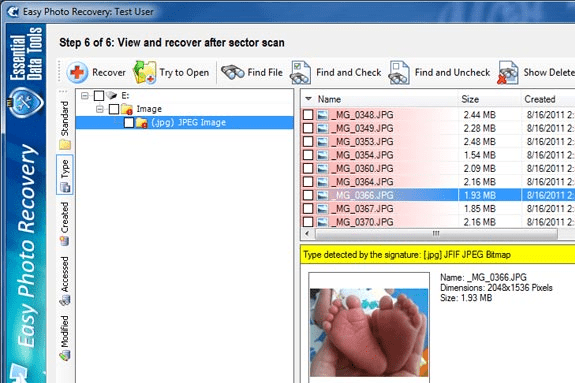
Easy Photo Recovery screenshot

Enlarge screenshot

Publisher's description
Editor's review
Submit your review

Easy Photo Recovery guarantees the safety of your photos and videos. Modern digital cameras and flash cards allow rewriting photo and video files many times and sometimes important files can be deleted or lost by mistake. This program will help you to restore deleted or unreadable photos and videos instantly.

Easy Photo Recovery recovers photos and video from various media storage devices, such as digital cameras, hard drives, mobile phones and all types of flash cards such as CompactFlash(type I/II), IBM Microdrives, SmartMedia, MultiMedia (MMCs), Secure Digital (SD), SONY Memory Stick and others. The program recovers files from damaged flash cards and even after formatting the media storage device.

Like no other recovery tool, Easy Photo Recovery is easy-to-use, includes a clear interface and detailed documentation. Featuring a step-by-step interface, it will guide you through several stages of data recovery. A few clicks is all that's needed. First, select the files that you need to recover and then choose the disk and the folder where the files should be saved. Click the "Start" button and wait until the disk scanning is complete. You will recover your lost photos or video in seconds. All recovered files are kept in the selected folder.

Easy Photo Recovery is designed not only for digital camera enthusiasts, but also professional photographers. It will be helpful in photo studios and digital photo printing services. Its numerous awards prove that the program is one of the best in its class.

Editor review: Reviewer, 2009-09-14 12:38:00

Easy photo recovery supports recovery of your Image files, photo files, video files, and audio files. This software will help you to recover your lost files and data from all types of media. It is nicely designed considering user requirement for file recovery after an accidental deletion, power spike, virus attack, hardware malfunctions. You can also have the facility to restore unreadable or deleted photos and videos all at once.

Features: The program will scan your data storage device like hard drive, USB disk or flash memory in order to find deleted or lost files. Program knows the internal file structure so it can automatically recognize a file by looking at the seemingly random data on the drive. After a recognized data sequence is located, you can initiate recovery process and the program will copy recovered files sector by sector to another disk.

The application wizard helps you to recover your lost or deleted files by following step by step process. Select your hard drive, USB or flash memory card from where you want to recover your data. Then you need to select which file type you would like to recover. Software provides check-boxes to select file type and sub type from Image files, photo files, video files and audio files. In the next steps, sector by sector scanning mode allows you to choose option for scanning as to “scan free drive space only” or “scan entire drive”. Scan free drive mode takes less scanning time than scan entire drive. As per your requirement you can choose an option. Then select target folder where you would like to save recovered file. After file system scanning is done, list of found files will be displayed on the screen. You can see the detailed information of found file to make decision to recover. In next step you choose files/folder which you want to recover then program will perform deep scan every sector on your drive to recover file. After recovery, it will display the list of files recovered, these files get stored at the defined location.

Overall: This is excellent software for image recovery from hard drive and removable storage devices.

Visit homepage of Easy Photo Recovery

Download Easy Photo Recovery 2.5


memory recovery
mmc recovery
recover formatted sd card
photo restore
memory stick tool
formatted file recovery
recover lost photos
handy photo
restore deleted email
flash memory format

Programs related to Easy Photo Recovery

Copyright © 2001-2009, Free Downloads Center.