


Publisher's description
There are many tools on the market that advertise an ability to recover accidentally deleted files. But do they stand behind what they offer?
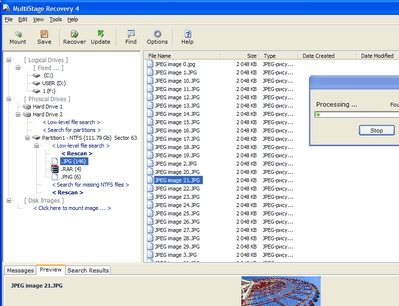
A common approach to deleted file recovery is a comprehensive scan of a file system on your hard disk. A data recovery tool displays a number of files, usually thousands of them, in a window, and offers you the option of recovering one or more of them. But what if there are several versions of a file, all with the same name? This is a very common situation if you work with a document and save it periodically. The bad news is that once you save a new copy of a document, the old one may or may not get overwritten in whole or in part, depending on free disk space and the size of the document. All of the files will have the same name in the file list window of typical data recovery programs. If you recover the wrong copy, you will get a completely unusable file that contains no useful information, just digital garbage. What's worse, once you recover a wrong file, you may not be able to recover all other versions, including the correct one!
MultiStage Recovery is much smarter than that. This professional file recovery tool contains a specially developed smart filter that analyzes each and every deleted file for the possibility of its full and correct recovery. The program scans your hard drive, and only lists those deleted documents that can be successfully recovered. This removes visual clutter and greatly increases your chances to get back the correct latest version of your document.
MultiStage Recovery can salvage files from inaccessible and formatted partitions even in the most difficult cases such as when you re-formatted a FAT drive with NTFS, or vice versa. Advanced NTFS Scan and Advanced FAT Scan will directly access, scan and analyze a partition and look for erased file systems.
A common approach to deleted file recovery is a comprehensive scan of a file system on your hard disk. A data recovery tool displays a number of files, usually thousands of them, in a window, and offers you the option of recovering one or more of them. But what if there are several versions of a file, all with the same name? This is a very common situation if you work with a document and save it periodically. The bad news is that once you save a new copy of a document, the old one may or may not get overwritten in whole or in part, depending on free disk space and the size of the document. All of the files will have the same name in the file list window of typical data recovery programs. If you recover the wrong copy, you will get a completely unusable file that contains no useful information, just digital garbage. What's worse, once you recover a wrong file, you may not be able to recover all other versions, including the correct one!
MultiStage Recovery is much smarter than that. This professional file recovery tool contains a specially developed smart filter that analyzes each and every deleted file for the possibility of its full and correct recovery. The program scans your hard drive, and only lists those deleted documents that can be successfully recovered. This removes visual clutter and greatly increases your chances to get back the correct latest version of your document.
MultiStage Recovery can salvage files from inaccessible and formatted partitions even in the most difficult cases such as when you re-formatted a FAT drive with NTFS, or vice versa. Advanced NTFS Scan and Advanced FAT Scan will directly access, scan and analyze a partition and look for erased file systems.
User comments