


Editor's review
If you are a professional photographer then you might be having a massive collection of images. Managing such a wide collection of images gets difficult and eats up a good amount of your precious time. However, renaming images to arrange them in proper sequence is one of those time-consuming tasks related to managing image collection. Don’t go for manual renaming process, as now you can easily get it done with the assistance of RenameMaestro. The utility is an adept solution that supports renaming not just your images but any type of file and even folders in desired manner. It offers two file renaming modes; Single Action mode, and Multiple Actions Home mode. Using the utility you can assign date, time, numbers, letters, or any text to several files and folders.
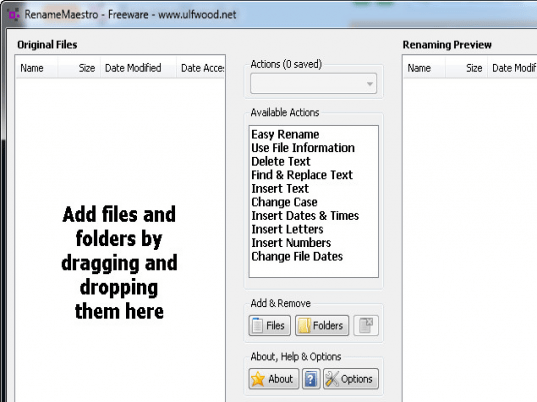
The console of RenameMaestro 2.5.2 is easily navigable, thus you can quickly understand and use the functions. Its console has been divided in three columns where the left pane presents the selected files and folders, mid pane consists of file/folders selection options and renaming modes, and right pane shows the renaming previews. Select files or folders using the Add & Remove options that automatically get queued up with left panel. Now, selecting the files/folders, you have to select the renaming mode and available action to give them desired name. You can use Easy Rename, Delete Text, Find & Replace Text, Insert Text, Change Case, Insert Dates & Times, Insert Letters, Insert Numbers, and Change File Dates. As you choose an action, the immediate preview would be displayed with right pane to help in deciding a better renaming action. When you’re through with the selection process, simply press Rename and the files would instantly be renamed. Similarly you can use Multiple Actions, where you can select and save several actions for renaming files/folders.
With the RenameMaestro you can rename your large number of files/folders instantly without pooling much of your time. The tool imparts a set of easily negotiable options, varied renaming actions, along with quick and effective functioning that makes it deserve 4 rating points.
User comments