
Free Downloads Center
e.g. Advanced Find and Replace 4.2

Categories

Latest Reviews

Popfax-Printer Internet fax

Popfax-Printer Internet fax
Popfax-Printer Internet fax, makes it simpler to send, receive and print faxes using your Internet connection.

SmartSerialMail

SmartSerialMail
SmartSerialMail, with the smart capabilities of this application you can set up a successful newsletter campaign.

Subscribe

Advanced Find and Replace 4.2 Download

Editor's rating  
Users' rating   (8 votes) Rate it!
License Shareware / $29.99
Downloads 2017
Publisher Abacre Limited
File size 1384K
Date added 2-Dec-2008
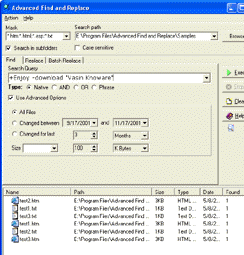
Advanced Find and Replace screenshot

Enlarge screenshot

Publisher's description
Editor's review
Submit your review

Advanced Find and Replace is exactly what the name implies. It's fast, easy to use, and a great time-saver for programmers and Webmasters in particular. This powerful utility lets you perform text searches on your local computer as if you were using an Internet search engine. It features support for operators that allow you to specify phrases, words to insist on (+), and words to ignore (-). You can easily apply filespec, date, and size filters to speed up the search. The program also allows you to replace simple or multiline strings. Specify your search-and-replace strings, then choose the action you'd like to take: delete the search string, insert text before or after it, or simply replace it. You can even apply multiple changes to large groups of files in a single operation and use optional confirmation if you need to be more selective. Excellent documentation is included.

Editor review: Reviewer, 2009-01-19 07:31:00

Search files with smart queries as with Google, replace simple or multi-line text in multiple files. The batch replace operation easily updates hundreds of different links in several files. Extremely fast, easy to use, with excellent help.

Pros: Advanced Find and Replace can search local disks and find text strings. If you need to replace the same by something else that can be done too at every place the search string is found. That makes it very suitable for webmasters and programmers who need to do these find and replace operations day in day out. With Advanced Find and Replace you are able to find your documents very quickly. Search queries can be formed as if you are specifying a query on the Google or the Alta Vista search engine. Operators like + or – that you use to form a query. A + would mean that the word following must be found and – meaning the word following should be excluded when searching. File specs, date and time as well as size can be used to additionally narrow down the search. Once found you can specify several replace actions such as deleting the string, insert something before or after the string or simply replace the target. You can even apply multiple changes to large groups of files in a single operation and use optional confirmation if you need to be more selective. You can use Perl style regular expressions to define searches.

Batch operation helps you make several changes in multiple files at the same time. It can be used as a full-fledged file renamer to modify file names. Search results are displayed on the user interface area. You have the option of saving these in XML and other formats. The application can operate from the command line interface as well.

Cons: Nothing adverse noticed.

Overall: A nice and powerful utility that does not involve much learning and is easy to use. This deserves a 4 star rating easily.

Visit homepage of Advanced Find and Replace

Download Advanced Find and Replace 4.2


find and replace tool
extended replace
binary search replace
multi find replace
text file replace
multiple replace
excel replace
string replace
unix replace
search and replace text files

Programs related to Advanced Find and Replace

Copyright © 2001-2009, Free Downloads Center.