


Editor's review
Backup applications are highly called for modern PC users, as the incidents of data loss due to system failures, virus attacks, and other such reason have soared up considerably. PC users keep browsing through a vast pool of websites over internet to find an appropriate backup utility for their PC. Well, if you still haven’t been able to get a proficient backup tool yet, then Backup Software Langmeier 5.5 is what can serve the purpose effectively. The program definitely would make it convenient for you to securely backup your data by encrypting it, followed by storing it on a variety of storage media, network drives, or ftp servers. It also supports easy data restoration from backup folders and archives created by the program. Further, the program integrates scheduler, clean up wizard, check backup, and even lets you switch between professional and easy modes.
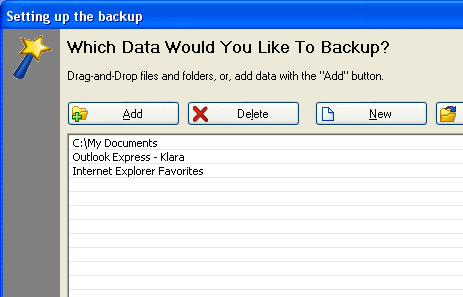
The Backup Software Langmeier 5.5 initially executes with easy mode and you can easily switch to professional mode, if required. The Backup data, Restore data, and Check Backup processes are equipped with wizard-driven interface, and scheduler, clean up wizard, and options are opened within a single window. With Backup data feature, you can add files, folders, or email and internet favourites for backup, or open a backup task you had stored earlier. Selecting the data for backup, you need to choose a location for storing the created backup archives and encrypted folders and finally create the backup. The data restoration process also goes step-by-step from selecting the backup folder or archives to deciding the destination and restoring the data. The backup process can even be scheduled to be carried out automatically at the specified time, and check the backup integrity. In addition, you can also clean up files from PC, and set the program to remove the historical files, and erase files from backup that’d been removed from your PC. Moreover, the utility also lets you alter configurations relating backup files, process, program behaviour, expert settings, encryption, and logging.
Using the Backup Software Langmeier 5.5 it becomes a child’s play for you to create encrypted backup for your important files and folders. The utility deserves to be rated at 4 points for its remarkable and easily operated tool-set, coupled with its overall optimum performance.
User comments