


Editor's review
As times passes the number of files and folders present on our system starts to grow at a striking rate. There maybe times when you look at your desktop or My document folder and find them layered with numerous files and subfolders. Now if you need to find a specific file, it may get quite hectic as the process of browsing various folders and sub-folders to finding the files you need, is quite long. But, you can rid yourself of the hassles by trying out InSight Desktop Search 1.5.0.8. The software offers users the flexibility to search the required files from any location on your system’s hard drive. The application supports carrying out full-text search for files on your PC while listing the results simultaneously. Along with this, it also provides preview feature and search filters to make it convenient for you to find the specified files without putting in much efforts.
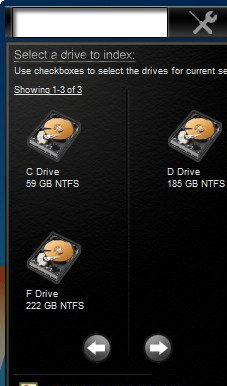
On launch the InSight Desktop Search 1.5.0.8, places itself at the top right corner of the PC screen. You’re shown a search bar where you need to type in the text and the possible results are shown listed with the sliding down column. Before carrying out the file search, the application prompts you to index the PC drives. Click on the icon with magnifier’s image and the application would detect drives and enlist them on the program screen. Make the selection of the drive and let the program scan and index the files present in the drive. After the indexing completes, it displays the file list to make the immediate selection from it. But, if you’re looking for a specific file then simply enter the file related text and simultaneously the best match would be displayed. The images can be previewed with the program and details relating the file is shown at the lower part of the program screen. Now, click on the file and it would be opened in its source folder.
With InSight Desktop Search 1.5.0.8, it becomes child’s play for the users to find the necessary file from the large pile of files and documents present at your PC. The program justifiably is given 4 rating points for the instant search feature, which facilitates easy file accessibility.
User comments