


Editor's review
It is necessary for every user to keep files synchronized between a desktop & laptop or between multiple drives on you desktop. Advanced Directory Comparison and Synchronization utility helps you to do this. Its main function is to synchronize the files in a selected directory and its sub-directories on two different drives.
Features: This utility enables you to synchronize a number of different file types. The program does a great job of identifying what files have changed between consecutive synchronizations. Files that have been changed at either end over a time will be made consistent during the syncing process, i.e. they may be replaced with the newer or the older version depending on what you want. As a backup utility the program simply works as a cumulative file copying utility, each time your changed files are added or over-written into the backup location (it does not copy all files every time, only the ones that have changed).
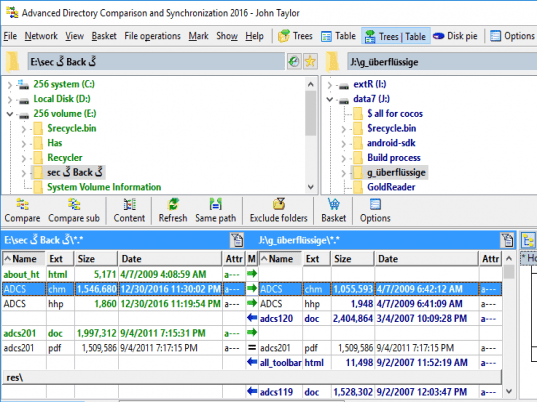
You can select your two directories to generate an easy-to follow side-by-side comparison. File size, time/date stamp, and attributes are prominently shown, along with color-coded arrows clearly marking the status of each file involved in the comparison. You can apply file spec filters, copy selected files to a third folder, and execute synchronizations with a single mouse-click. Other features include directories recursion, multi-directories comparison, .CSV and HTML-based comparison reports, disk space viewer, Log file Viewer, custom sorting etc.
The application gives lots of functionality and nice features but user interface is poorly designed. Usability and aesthetics are ignored while designing the user interface. This is good application for experienced users who are conversant with the functions and least bother about user interface. Application provides very good features to improve your quality of synchronization.
Overall: The application carries synchronization between multiple drives on the same computer or network computers. but it has a poor interface that discourages inexperienced user.
User comments