
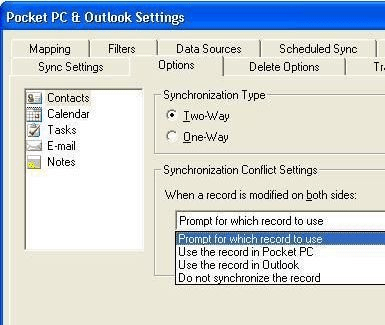
PDAsync is the ultimate handheld sync software, which allows you to synchronize your calendar, contacts, tasks and e-mail between your mobile devices and applications on your PC. It places an easy-to-use synchronization menu inside your PC application. You no longer need to run a separate application to synchronize; simply click on the synchronization menu. PDAsync goes beyond your proprietary PDA software because it works with all major personal organizer software applications on the market. In addition, it supports the auto-detect feature that enables you to synchronize automatically when you connect your mobile device to your PC. PDAsync uses Rapid Transfer Technology™ to provide synchronization at least two times faster than other products on the market. After initial synchronization, it sends only your changes, saving you valuable time.
AccuHash 2.0 is windows utility to protecting the integrity and verify the accuracy of data files using message digest (hash, checksum) calculation al...
Advanced Flash Synchronizer 1.3 will help you back up and synchronize data on two computers that is not connected directly by the help of the external...
AD File Transmitter is an application, allows you to automate frequent file transfer operations between different offices or different computers and p...
This is a very powerful, yet easy to use directory compare and synchronize program. Perfect for synchronizing large numbers of files between PC's. I...
AKS Image Comparer is a utility that allows you to compare two JPG files and show differences between them. For instance, this tool allows you to comp...
AllSync is the professional solution for your data synchronization and backup needs on individual workstations, laptops, or throughout your entire net...
When you work, even just occasionally, on multiple computers, you usually want your files to be where you are. Although you could always remember to c...
We all know that there are special utilities with the help of which practically any person can restore a file, deleted by standard means of Windows. W...