


Editor's review
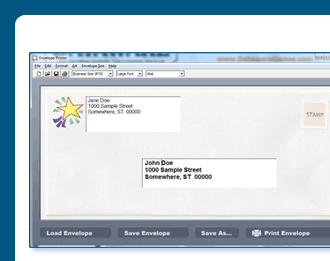
Envelope Printer is the quick and easy way to print addresses on envelopes. Type in the address, then press the print button. You can also save addresses for easy loading for future use.
Features: Envelope Printer is lets addresses to be printed on envelopes easily. It is as simple as typing the address in then ask for a print by clicking the print button. Addresses can be saved for later use. After an envelope is placed in the tray, type in the address and the return address in the space provided in the program display. The envelope will get printed. With new envelope option, the return address will remain the same. Load envelope will load a previously saved envelope. Save/ Save as will save the present envelope for future use.
Select this option when you are ready to print your envelope. It works with four standard envelope sizes: #10 business envelopes (4-1/8" x 9-1/2"), #6-3/4 personal envelopes (3-5/8" x 6-1/2"), European size DL (110 mm x 220 mm), and European size C5 (162 mm x 229 mm). These are the sizes most often in use as standard envelopes in business use. There are two sizes of fonts you can use. The return address is always printed in small size. The main address can be in either big or small font sizes. You can choose either Arial and Times New Roman fonts. You can choose from a variety of art to go beside the return address. You can also select none if you do not want to use art on your envelope. If you want to add your own custom image, select Custom and then load any 100 x 100 pixel bitmap image. To create you own custom image, use a paint program or image editing software to create a 100 x 100 pixel image, then save the image as a BMP file.
Overall: Generally fine but without a mail merge option it is of limited value.
User comments