


Editor's review
While working on any important project, often you may need to visit different sites and perform search for different things. However one must note that all the surfing and searching processes leave a trace on the system you have used. This could be harmful for your work as anyone can access the sites and view the content you’ve searched for. If you want to remain on safer side and get all the internet activity traces to be deleted permanently you can give try to the remarkable FastIEcleanup 1.3 application. It supports cleaning the surfing traces by removing the history, temporary internet files along with cookies, cache, etc. The program enables the users to set a particular time for cleaning process or perform it anytime you want.
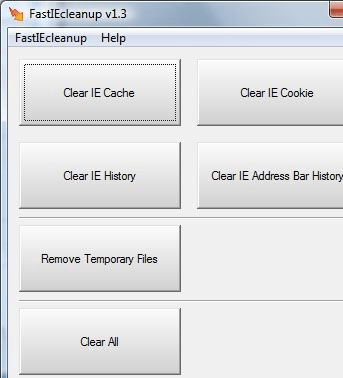
FastIEcleanup 1.3 application sports a neatly designed small interface in front of the users that has cleaning options placed right on the main screen making it easy for the users to access the required functions. The application requires you to simply click on the required option to perform the cleaning process for the specific type of files. The options provided by the program are Clear IE Cache, Clear IE Cookie, Clear IE History, Clear IE Address Bar History, Remove Temporary Files and Clear All. Press any of these provided options and the program would perform the cleaning process. To modify the settings you can access the Options features. Using this features you set the program to run at windows startup, and even set the program to clear any of the specific type of files with the startup, as preferred by the users. If you don’t get the time for manual cleaning through the program, then you can even set schedule cleanup to be performed for specific files at a specific interval of time.
The FastIEcleanup 1.3 stays at the system tray for easy access, and performs the cleaning process thoroughly to make your work on web safe. The program is rated with 3 rating points for the convenient feature-set and easy-going process to erase the traces of your internet activities.
User comments