
 |
 |
|
|
 |
 |
 |
 |
|
|
Volumouse provides you a quick and easy way to control the sound volume on your system - simply by rolling the wheel of your wheel mouse.
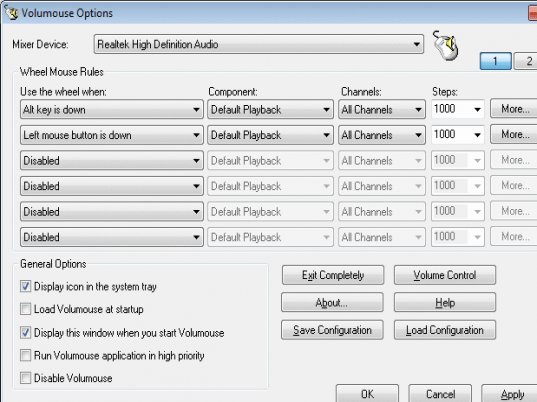
It allows you to define a set of rules for determining when the wheel will be used for changing the sound volume. For example: You can configure Volumouse to use your mouse wheel for volume control when the Alt key is hold down, when the left mouse button is down, when the mouse cursor is over the taskbar, and so on...
When the conditions that you define are not satisfied, your mouse wheel will be used for the regular scrolling tasks, exactly as before.
|
|
Editor review: Daily Reviews Team, 2004-10-18 01:10:10
Volumouse is a utility which can enable your mouse to be used as your volume control tool.
Now you need not struggle to find your volume button on your computers. You can simply use the scrolling functionality of your mouse wheel to increase and decrease volume. The tool can be customized for use by you. Specify the actions which you need to perform in order to convert your mouse wheel into a volume controller. For example, set the mouse wheel rules as seen on the interface as Alt key is down, left mouse button is down and so on. Only when all these actions specified are performed, the mouse wheel can be used for setting the volume. If any of the actions are not performed, the mouse wheel will be performing the normal scrolling actions. You can also specify the startup and display options of the utility.
The tool supports most Windows versions and can be easily installed without complications.
|
 |
 |
Visit homepage of Volumouse
Download Volumouse 1.10
Popular search terms related to Volumouse:
cursor, taskbar, volume, rules, tasks, key, button, quick, mouse, sound
|

scroll wheel edit video volume mouse over mouse cur sound changing auto volume control volume increase wheel to spin plus mouse wav volume manager

Programs related to Volumouse
|