
Free Downloads Center
e.g. SafeHouse Personal File Encryption 3.03

Categories

Latest Reviews

MPSuperShape

MPSuperShape
MPSuperShape is an excellent add-in for Microsoft MapPoint that allows you to combine and intersect shapes.

WinStart Manager

WinStart Manager
WinStart Manager, the advanced tool that gives a complete view of all the programs and applications launching at the Windows startup.

Subscribe

SafeHouse Personal File Encryption 3.03 Download

Editor's rating  
Users' rating   (1 votes) Rate it!
License Shareware / $29.99
Downloads 572
Publisher PC Dynamics, Inc.
File size 8552K
Date added 10-Feb-2009
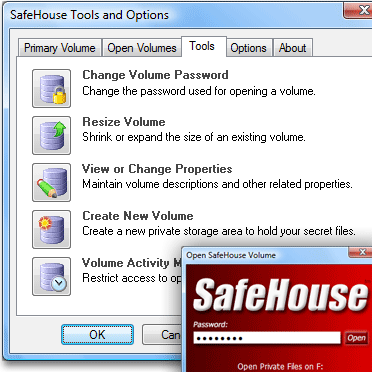
SafeHouse Personal File Encryption screenshot

Enlarge screenshot

Publisher's description
Editor's review
Submit your review

SafeHouse provides total privacy and protection for your sensitive files and folders using passwords and strong encryption. SafeHouse features military-strength encryption which is completely transparent to the way you work and is compatible with all Windows applications.

This software is amazingly simple to use and works on all drives, including external USB drives, USB memory sticks, network servers and even on CD/DVDs for making secure backups.

SafeHouse keeps your confidential files in expandable giant data vaults which can only be accessed after entering your secret password. Your documents, photos, videos, spreadsheets and other files are completely invisible and encrypted once under the total protection offered by SafeHouse.

Once SafeHouse accepts your password, your files and folders are fully accessible using a new disk drive letter added to Windows to represent your data vault.

Any files you drag and drop to this new drive letter are instantly and automatically protected. The SafeHouse disk drive letter appears and works just like any other disk drive letter in Explorer and all of your favorite Windows programs.

SafeHouse adds even more security by allowing you to store your passwords to smartcards and USB memory sticks. No matter how many passwords you keep, you'll never need to type them again. All you need to remember is the single PIN to your smartcard or memory stick.

SafeHouse can even automatically lock up or suspend access to your files after a specified timeout or when Windows hibernates. And because your files are always encrypted, you are also protected from accidental shutdowns.

There is a Professional Edition of this software available which includes essential features for mass deployment and password recovery.

Editor review: Reviewer, 2008-01-28 08:34:00

With the SafeHouse Personal File Encryption 3.00 you can have your critical files and all important data securely protected in a hassle free manner. It can also work with external USB drives, network servers USB memory sticks, and CD/DVDs so that you can have safe backups. For adding the files or folders to the new drive letter vault and once added it would be password protected. The features of the program can be used by even a normal user without any difficulty.

Once you install the program it stays at your system tray and after restarting your PC it becomes active. First it asks you for the password that would be set for the protection of the new letter drive vault. Then following the steps you’re also required to create the volume and set the destination for it. Right click on the program icon and it would show the features to ‘Open Primary’, ‘Open Volume’, ‘Tools and Options’, etc. While opening the drive vault it asks you for the password once you enter it you can access the files and folders to that it contains. Add new folders or files just by dragging and dropping them to the secure vault. For having the drive vault to be closed for having the password activated you need to right click on the system tray icon and click ‘Close all’. When you click the Open Volume then it shows a small window with the options set on it. Select the Open as drive and the folder location. The name of the volume is shown, you need to enter the password and click on ‘Open Volume’. Browse the folder and start working then for closing you need to click on Close Volume option. Select the drive and click Close Volume for making it secure again with the password. You can also change the password anytime.

SafeHouse Personal File Encryption 3.00 receives a score of 3.5 rating points. The program should have ideally consisted of the features that allow users to hide their files and generate passwords which are commonly available in software of its class.

Visit homepage of SafeHouse Personal File Encryption

Download SafeHouse Personal File Encryption 3.03


usb sticks
usb file encryption
usb applications
windows usb tools
repair usb memory
usb key password protection
how to burn iso to usb
usb internet
drive letter
usb flash disk data recovery

Programs related to SafeHouse Personal File Encryption

Copyright © 2001-2009, Free Downloads Center.