


Editor's review
Sometimes you receive password protected word file and you don’t know the password to open the file. To open file, either you need to contact the owner or use some password cracking software. Word password unlocker utility helps you recover password for your word file to open and edit. It support all Microsoft Word version from 97 to 2007 with three dynamic password recovery modes, brute force attack, customizable brute-force with mask attack, and smart dictionary attack.
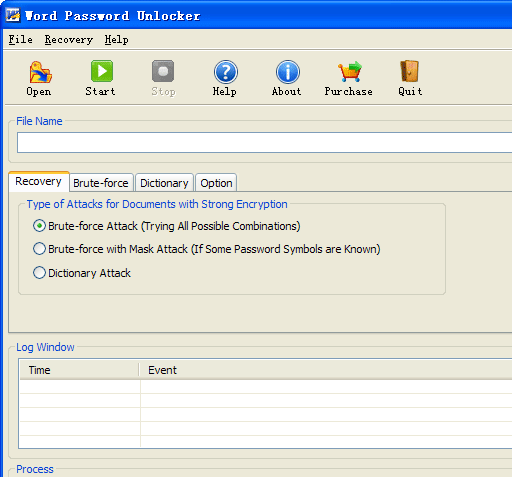
Features: It has a nice user interface; you can perform recovery operation from a single screen. Open password protected files to recover password. In the recovery tab, select appropriate mode to recover the password. Application supports three modes such as Brute-force attack, Brute-force with Mask attack and Dictionary to recover password faster. With Brute-force Attack mode, it tries for all possible combinations no password clue. Use Brute-force with Mask Attack, if you remember part of the password and use Dictionary Attack mode if the password is frequently used or you can provide a dictionary file. Brute –force attach mode has various options like set password length as min length and maximum length. Select character set as a-z, 0-9, A-Z or special character, you can also add custom character set, prefix and suffix. For dictionary attack perform setting as smart mutation, set mutation count and maximum password length, add dictionary file and add default dictionary file to speed up password recovery. With General option you can set program priority as Idle or high, it also has other option like enable auto-save time and shutdown computer after recovery finishes. Once all settings are done then click on start button to start password recovery process. Application will display result of recovered password in a popup window. Now you can use this password to open file, you can remove password from the file for future use.
Overall: This is a nice utility to recover password from your word file to open and edit. Be aware it is a short distance to use it for illegal purposes.
User comments