


Editor's review
Block Website(s) on your computer easily. Backup / Restore settings easily. Block website using entries to hosts file.
Features: For many a reason one may want to block specific web sites. The site may be a known malware site, a known phishing site, could be a porno site you want to block from viewing by children and so on. This utility helps you do that by letting you edit and thereby add or delete or correct mistakes in the Windows Hosts file. Hosts file is the file looked up during access to various websites and if there is an entry blocking the URL then none of the browsers used in your system will access the URL. You are able to change, backup / restore settings easily. Block website using entries to hosts file, due to which all browsers will not allow navigation to the blocked website.
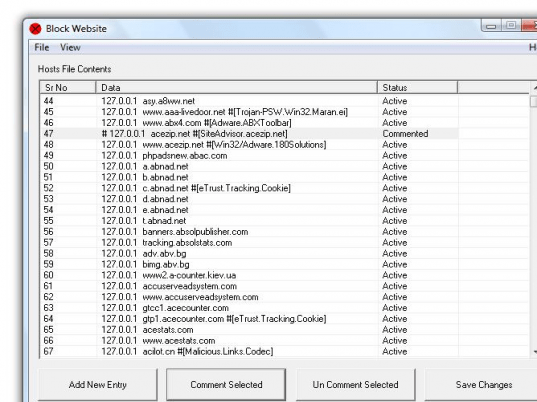
The interface is simple. It shows the current content of the Hosts file. The interface has controls "add new entry", "comment selected", "Un-comment selected" and "save changes". The way this would work is when you click on the new entry there`s a pop up that take the URL as well as the IP address of the host to be blocked. If for some reason you want to permit access to an existing blocked entry, simply comment it out. This is actually a temporary change. If need be one just has to un-comment the entry to introduce the ban again. Clicking on save changes, saves the changes made.
Overall: Easy to use simple utility meant for a specific task.
User comments