


Editor's review
After setting a new password to your Windows, it might happen that you forget the change you made and thus confront troubles in logging into your system. Even, it might be the case that your kid mistakenly sets a password to your Windows making your entire data inaccessible to you. However, whatever the case may be you finally would end up spending loads of money in getting technicians help or formatting your system. But, now needn’t worry as by using a simple application you can easily recover your forgotten Windows password and unlock your user account. It prepares a CD for Windows password recovery that further is utilized for recovering/resetting Windows password and unlocking it. The program is capable of resetting and unlocking password for all user accounts on your Windows, be it administrator or guest.
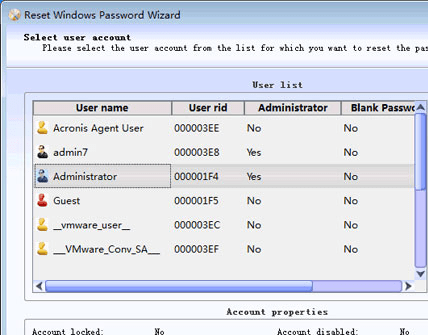
For beginning the recovery process with Lazesoft Recover My Password Pro 1.0.0, you’d require forming an ISO image file and burn it to a CD. Now, boot from the CD and follow the simple steps for resetting your password and unlocking your account. The program automatically starts working and the first step for password recovery begins with selecting the Windows volume from the presented dropdown list. After choosing the volume, it detects and presents the list of user accounts along with their properties information displayed at the lower part. Select the desired account for resetting or unlocking it, and press ‘Next’ where you’d be shown the name and description of the account. Further, press Reset/Unlock button placed over the screen, define the new password, and finally press ‘Finish’, immediately after which your system would reboot and allowing you to access the account with ease.
Lazesoft Recover My Password Pro aids you in gaining access to your admin account by resetting your forgotten password. For its commendable functioning and simple feature-set the program gets 4 rating points.
User comments