


Publisher's description
Services :: Total Commander Plugin Print
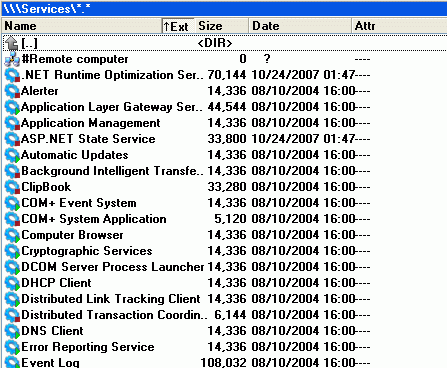
Services management console for Total Commander
Name of plugin: Services
Category: Total Commander File System Plugins
Status: Freeware
Author: Serge Kandakov
Download
Total Commander Plugins :: Services Total Commander Plugins :: Services Total Commander Plugins :: Services Total Commander Plugins :: Services Total Commander Plugins :: Services Total Commander Plugins :: Services
Features of "Services":
- List of services registered in the system.
- Enchanced control state of service function.
- Deleting of services from the system.
- Editing of the serivces properties.
Additional:
- Allows to run Windows applications as services.
The benefits include:
- allow apps to survive logoff/logon sequences, hence saving the overhead of
re-starting them for each new user
- allow server apps to come-up and service requests even when no user is logged-on
- allow apps to run and perform a task in a specific logon account, different
from the currently logged-on user
Note: app2srv.exe file must be located in the same folder as the plugin file (Services.wfx)
Keys:
Del - delete the remote machine from the list.
F7 - create the new remote connection.
F5 - start the service (can be changed in settings).
F6 - stop the service.
F8 - restart the service.
After installation "Services" is available in "Network Neighborhood" of Total Commander. http://www.anvir.com/
Services management console for Total Commander
Name of plugin: Services
Category: Total Commander File System Plugins
Status: Freeware
Author: Serge Kandakov
Download
Total Commander Plugins :: Services Total Commander Plugins :: Services Total Commander Plugins :: Services Total Commander Plugins :: Services Total Commander Plugins :: Services Total Commander Plugins :: Services
Features of "Services":
- List of services registered in the system.
- Enchanced control state of service function.
- Deleting of services from the system.
- Editing of the serivces properties.
Additional:
- Allows to run Windows applications as services.
The benefits include:
- allow apps to survive logoff/logon sequences, hence saving the overhead of
re-starting them for each new user
- allow server apps to come-up and service requests even when no user is logged-on
- allow apps to run and perform a task in a specific logon account, different
from the currently logged-on user
Note: app2srv.exe file must be located in the same folder as the plugin file (Services.wfx)
Keys:
Del - delete the remote machine from the list.
F7 - create the new remote connection.
F5 - start the service (can be changed in settings).
F6 - stop the service.
F8 - restart the service.
After installation "Services" is available in "Network Neighborhood" of Total Commander. http://www.anvir.com/
User comments