


Editor's review
Internet and local network are very common to most people and you most likely have used both. But have you heard of sharing your USB device through local network or internet? Well to achieve it and access the USB device from your remote computer; you just need to install the USB over Ethernet 1.7 on both the systems. It provides you with the access to the shared devices over both and thus requires no extra hardware to be added to your PC. USB over Ethernet 1.7 is capable of using the hardware of your PC and allows sharing the data by connecting the shared devices remotely. Easily installed it supports a large variety of USB devices and you are not required to have any technical knowledge to use it.
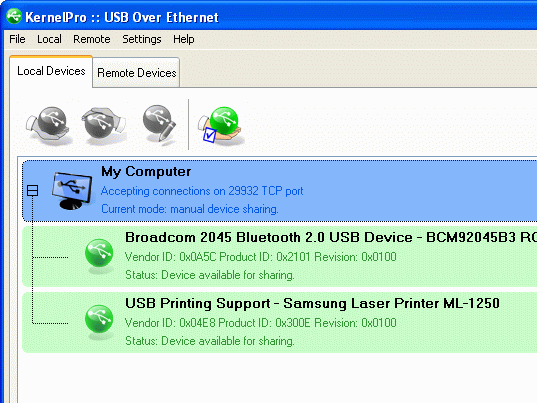
USB over Ethernet 1.7 helps by providing the access to the shared devices easily. For using USB over Ethernet you need to install it on the PCs that you want to work with. Launch the program and make the selections for sharing the USB. Select the USB device that is shown on the main window and then select ‘Share Device’ to make it available for the connection. When you want to connect to the USB that you have shared you need to add the remote system having the shared USB, to the list. Then you would get the list of the available devices for connecting to. You need to make the selection of the USB devices from the given list and ‘Connect’ to the device. Deny the sharing and connection of particular USB devices. It stays at your system tray and you can quickly share/unshare or connect/disconnect the device. Edit the properties of the device that is currently selected in the USB Device List.
With easy user interface the USB over Ethernet 1.7 provides you with easy connection to have the information available even if you have to work with another PC. The software is worth using and has the features that are easy to configure providing optimum performance. In consideration to all the aspects it has been rated with 3.5 rating points.
User comments