


Editor's review
WinUtilities File Splitter can split any type of file into smaller pieces and rejoin them to the original file. It helps you copy the split ones to floppy disk or CD/DVD, or send them via e-mail.
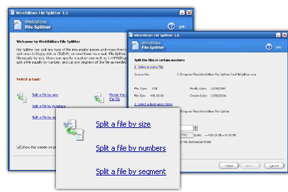
Features: WinUtilities File Splitter can split large files into smaller ones. You can combine the pieces together to get the original large file too. There are no limits to how large a file can be or how many pieces it can be split into. Whatever be the reason for splitting, copying into media or sending through email is easy. As combining back into the original at the destination is no problem at all. When the file is being split, a batch file BAT is created. Simply running the batch file recreates the original from the pieces. It also names the file with the original name. You are able to print any folder content, keep track of the split items and view available RAM. The interface is simple. The opening screen offers the options of splitting a file by size, by numbers and by segment. When splitting by size, you can specify the size of the splits in KB/MB sizes. Split by numbers takes in just the number of pieces that are required and the file will be split into as many files of uniform size. In the by segment option you specify the starting byte position and ending byte position.
Overall: It is a nice and simple utility. But utility wise there are not many reasons that you may need such a utility today. May be for e-mail attachments only!
User comments