
 |
 |
|
|
 |
 |
 |
 |
|
|
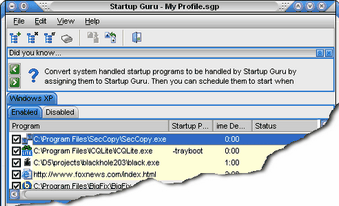
Startup Guru will manage the programs that load on your Windows computer each time it starts. You can add, remove or temporarily disable any item. Great for removing adware/spyware or anything else that is slowing down your ability to get started using your computer! The ability to schedule startup items is another handy feature. Many programs don't need to start right away, so setting them to start at a specific time after bootup helps to optimize the bootup process. By spacing out the many programs that may be loading it will keep programs from fighting for your precious system resources all at once. Doing so allows you to access your computer faster! Startup Guru can also remove reoccurring entries from your system areas on boot up. If you have some type of adware/spyware that keeps inserting itself you can allow Startup Guru to remove the entry on bootup before it is accessed. In the Advanced mode you can utilize Profiles to store bootup options. Create a profile for when you play games, one for when you're doing business, or any other specific need and assign it to load the next time you log in or boot up. Your system will load the assigned programs and you'll be off and running in no time! Also allows character monitoring so you can start any program from anywhere! Type ASDF/ and have your favorite program start right up. No diving through a lot of menus to get to where you want to me.
|
|
Editor review: Daily Reviews Team, 2006-11-30 01:10:10
Startup Guru the most advanced guru that will enhance a smooth and stable startup for your system.
Enhance the way your system starts-up each time and remove all possible startup hiccups with this tool. This elite manager will manage all the programs that load on your Windows computer each time it starts. The tool allows adding, removing or temporarily disabling any item in the start-up so that you have a clean, stable, fast and smooth start-up. The program is also capable of detecting and removing any possible adwares or spywares that tend to slow down the start-up. The tool is efficient in removing junk and obsolete files to provide you with free disk space. One can add, remove and edit startup programs, backup and restore them efficiently with this tool. Further it allows removing reoccurring entries from your system areas on boot up.
Other features include; scheduled start-ups, advanced mode with which you can utilize Profiles to store boot up options, and speed-up your Windows start-up.
|
 |
 |
Visit homepage of Startup Guru
Download Startup Guru 2.2
Popular search terms related to Startup Guru:
adware, spy software, fax software, spyware, ftp software, schedule, startup, faster, remove, manage
|

boot startup the guru load faster start computer remove old aol from computer create boot image windows boot fixer business startup recovery boot disk add ware remove

Programs related to Startup Guru
|