
Free Downloads Center
e.g. EControl Syntax Editor 2.60

Categories

Latest Reviews

Asterix and the Great Rescue

Asterix and the Great Rescue
Asterix and the Great Rescue is a fun and fanciful game suitable to all ages with an addictive game-play.

Proposalsmartz Proposal Writing Software

Proposalsmartz Proposal Writing Software
Proposalsmartz Proposal Writing Software is an handy application that allows you to work about smartly with your business proposals and documents.

Subscribe

EControl Syntax Editor 2.60 Download

Editor's rating  
Users' rating   (2 votes) Rate it!
License Freeware / $0
Downloads 2665
Publisher EControl Ltd.
File size 952K
Date added 26-Sep-2008
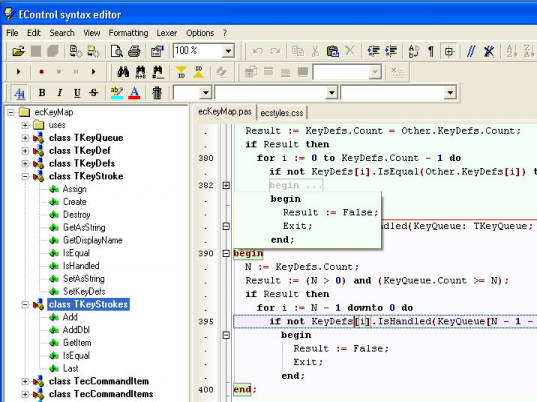
EControl Syntax Editor screenshot

Enlarge screenshot

Publisher's description
Editor's review
Users' reviews (1)
Submit your review

Powerful text editor with syntax highlighting.
This editor is built using EControl Syntax Editor SDK.
The unique and more important feature is 100% customizable lexer, so you can adjust it for any type of text file. Lexer uses standard VCL resource streaming and stores itself in DFM text format.

Features:
- Delphi 2007 like editor;
- Fast loading huge files (several megabytes).
- Localized: English, Russian, German;
- Split screen;
- Customizable text folding;
- Customizable text structure tree view;
- Customizable keymapping;
- 100% customizable lexer (syntactical analyzer). Comfortable visual lexer editor;
- Nested lexers highlighting.Combining several lexers in one using "Sub Lexer" rules;
- Code templates;
- Auto-correction;
- Spell checking;
- Print/ print preview;
- Powerful search/replace (regular expressions, search all ...);
- Incremental search;
- Export in HTML/RTF with syntax highlighting;
- Copy selection to clipboard in RTF;
- Block staples (hierarchical text representation);
- User ranges allows custom lexer independent highlighting and text folding;
- Stack-based markers like in CodeRush;
- Unlimited bookmarks;
- Animation;
- Normal, column-oriented and line selection, clipboard operations;
- Right margin, persistent blocks, keep caret in text and numerous other options;

Highlighting features:
- Highlighting styles can use any font;
- Text region borders;
- Hiding parts of the text using Hidden attribute of the style;
- Multilevel style merging;
- Dynamical highlighting depended on caret position. Highlights valid blocks (for example, current procedure, brackets, "begin" ... "end" blocks ...);
- Line highlighting;
- Text partition by means of line separators like in Visual Basic IDE;
- Hyperlink highlighting
- Custom formatting

Default Lexer Library contains lexers for file types (over 30): C++, Pascal, Basic, SQL, Delphi Resources, HTML & XML, Style sheets, Ini files, Help Contents, Assembler, PHP...

Editor review: Reviewer, 2009-03-12 05:13:00

Powerful text Unicode editor with syntax highlighting, text folding, text structure tree view. The unique and more important feature is 100% customizable lexer, so you can adjust it for any type of text file. It works fast even with huge files.

Features: This is a text editor that provides syntax highlighting. This is built from Econtrol Syntax Editor SDK. EControl Syntax Editor application is fully functional plain text editor with syntax highlighting and text structure view. Editor allows working with text in different formats and codings. The Editor represents text in hierarchical view that make navigation and analysis easier. Text is analyzed by the fully customizable syntactical analyzer (lexer). User may edit existed or create new lexers. What`s unique is that this lexical analyzer (or the lexer) is completely customizable. That way it can be adapted for syntax checking for a whole lot of programming languages. Lexer uses standard VCL resource streaming and stores itself in DFM text format.

It is a Delphi like editor and it can load large files quickly. Localized versions are available for English, Russian, Magyar, Ukrinian and German. User formatting is also possible, as in rich text editor. User formatting is saved in separate file which does not have influence on original text. Editor allows exporting text with syntax highlighting and custom formatting to HTML and RTF formats. Also it allows copying of text to clipboard in RTF format. You may use multi-replace tools to automate text conversions. Multi-replace tool allows creating replace rules and apply them to whole text or to selected text.

Overall a powerful yet easy to use syntax checking editor.

Visit homepage of EControl Syntax Editor

Download EControl Syntax Editor 2.60


text component
configuration file editor
text based
syntax highlight
gif text editor
key editor
syntax font
photo text editor
mpeg file editor
system editor

Programs related to EControl Syntax Editor

Copyright © 2001-2009, Free Downloads Center.