

Editor's review
You might have seen the pages that are password protected and require entering the required password for access to that page. Now if you have ever felt the need for creating such pages on your website then you will be glad to know that such pages can be made few simple step and selection with the CoffeeCup Password Wizard 5.0. For enabling the protection for the WebPages you need not to have any special knowledge of HTML or Flash. It supports you with the customization features to work, maintaining the look of your page. While you set the password protection, you can have the preview with the program or browser as you want. It also supports working in multiple framesets, and provides redirection for the incorrect logins.
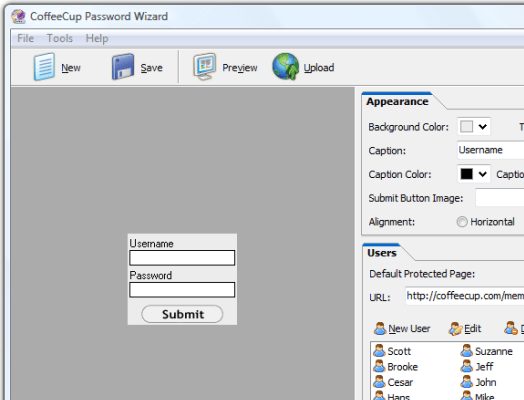
The CoffeeCup Password Wizard 5.0 has a neat user interface with clean contours to work with. You can open the New Project and select the features for enabling the password protection. You can make the selections for the Appearance option. Select the background color and enable the transparent feature. Enter the required Caption like Username and Password and set the image or text for the Submit feature. You can make the selections for the Users by defining the URL and adding or deleting the users. You can also set the features with My Sites. When you have made the required selections then you can have the Preview and Get the Code. You can even save the project for further use. The password protection function is easy to upload to the website with the built in FTP Uploader in the program.
The CoffeeCup Password Wizard 5.0 lets you protect the WebPages so that only authorized people can access it. It ensures safety of the content and helps you to apply the password protection to the pages with your desired customizations. Considering all the aspects the software has been rated with 4 points which it truly deserves.
User comments