
Free Downloads Center
e.g. Dreamweaver Menu Extension 3.91

Categories

Latest Reviews

Vitascene Starterkit

Vitascene Starterkit
Vitascene Starterkit is a professional tool that allows to manage and enhance the effects and transitions of images.

eCover Engineer

eCover Engineer
eCover Engineer, the professional tool that allows you to create outstanding eBook covers, CD covers, DVD covers and software box covers.

Subscribe

Dreamweaver Menu Extension 3.91 Download

Editor's rating  
Users' rating   (1 votes) Rate it!
License Shareware / $49
Downloads 1958
Publisher Dreamweaver Menu
File size 4763K
Date added 27-Apr-2009
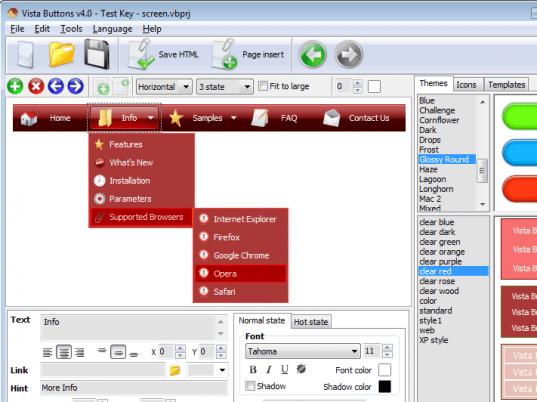
Dreamweaver Menu Extension screenshot

Enlarge screenshot

Publisher's description
Editor's review
Submit your review

Vista Buttons Menu Extension for Dreamweaver allows you to create fast, neat, and eye-pleasing menu navigation, directly in Dreamweaver 3.0, Dreamweaver UltraDev 1.0, Dreamweaver 4, Dreamweaver UltraDev 4.0, Dreamweaver MX, Dreamweaver MX 2004, Dreamweaver 8, Dreamweaver CS3 or CS4. Create, modify, add css menu to your website without leaving your favorite web design editor! Fully customizable appearance! Use one of the 500+ website buttons, 100 submenu designs, 6600+ icons, 50 ready-made samples, or create your own buttons using the special tool - Theme Editor. The possibilities of creating web navigation are endless with support for custom images, icons, colors, font styles and so on. Create both horizontal and vertical navigation bars and submenus with any amount of items on one page. Submenus will drop down over all the page objects (select, flash, object, embed). The dhtml menus generated by Vista Buttons run perfectly on all old and new browsers, including IE5,6,7,8, Firefox, Opera, Safari and Chrome on PC, Mac, and Linux. Vista Buttons menus have a structure based on HTML list of links (LI and UL tags), readable by any search-engine spiders and text browsers. You don't have to know HTML, javascript, css or any other coding languages to make rollover, professional, cross-browser, search engine friendly web menus. To insert a menu on your page, you should click Vista Buttons Menu button on the toolbar in Dreamweaver. Vista Buttons editor launches, allowing you to create a menu using a powerful & easy-to-use interface with built-in preview. Select a pre-built themes or templates, add icons, adjust style settings as you want, and click 'Save and Close'. Your dropdown menu will be inserted into your web page. Making changes is just as easy. Click the Vista Buttons Menu button on the toolbar and select "Edit menu" or "Remove menu" buttons.

Editor review: Reviewer, 2009-05-28 08:40:00

Vista Buttons Menu Extension for Dreamweaver allows you to create fast, neat and eye-pleasing menu navigation, directly in Dreamweaver. Create, modify, add CSS menu to your website without leaving your favorite web design editor!

Features: Vista Buttons Menu Extension for Dreamweaver lets you professional looking navigation menus for your website quite easily. This package lets you do neat and pleasing menus in several versions of Dreamweaver that includes Dreamweaver 3.0, Dreamweaver UltraDev 1.0, Dreamweaver 4, Dreamweaver UltraDev 4.0, Dreamweaver MX, Dreamweaver MX 2004, Dreamweaver 8, Dreamweaver CS3 or CS4. Creating, modifying and adding CSS menu to the site is easily done. You do not even have to quit the code editor to do that. There`s a special tool named Theme Editor that lets you create the buttons. Or simply choose from a combination of 500 and more button designs, 100 odd submenu designs and 6600+ icons and 50 ready design samples.

A choice of custom images, colors, font styles etc. gives you an unlimited choice of creating the navigation menus. Horizontal as well as vertical submenus an be created on the same page. You can have any amount of menu items. The sub menus drop down over the elements on the page. The elements may include select, flash, object, embed etc. The code generated for the DHTML in the menus runs compatibly with most browsers. These include IE5, 6, 7,8, Firefox, Opera, Safari and Chrome on PC, Mac, and Linux. The menus have a list of links structure that is readable by search engine spiders and text browsers. No programming skills are required to create a rollover, professional, cross-browser, search engine friendly web menus.

Overall: A nifty package that lets you develop dynamic menus very easily. It is easy to use.

Visit homepage of Dreamweaver Menu Extension

Download Dreamweaver Menu Extension 3.91


vertical flash menu
horizontal menu dreamweaver
flash menu templates
drop down menu for dreamweaver
drop down menu in dreamweaver
create your own browser toolbar
flash drop down menu
menu dreamweaver
font search
themes vista

Programs related to Dreamweaver Menu Extension

Copyright © 2001-2009, Free Downloads Center.