
Free Downloads Center
e.g. FAQGenie 1.3.0

Latest Reviews

Visual Importer

Visual Importer
Visual Importer, the only versatile tool that can export, transform or load database data at the rate of 14,347 records per second.

AutoTRAX Design Express

AutoTRAX Design Express
AutoTRAX Design Express is a very useful Electronic Design Suite specially designed for Electronic Engineers.

Subscribe

FAQGenie 1.3.0 Download

Editor's rating  
Users' rating   (4 votes) Rate it!
License Shareware / $0.00
Downloads 1294
Publisher Dev Virdi
File size 788K
Date added 29-Feb-2004
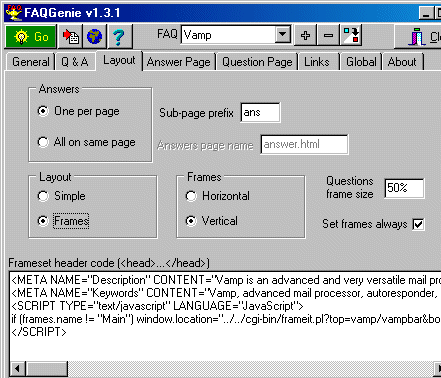
FAQGenie screenshot

Enlarge screenshot

Publisher's description
Editor's review
Submit your review

FAQGenie is a tool that takes the hassle out of writing and maintaining a FAQ on a website. You simply enter your questions and answers, arrange them according to your preferences, select a suitable layout and with a click you have a professional looking FAQ page. You have the option to have the document on a single page or in frames - both horizontal and vertical options are supported. You can have the answers all on a single page or one per page - the latter being very useful for cases where you have a long document which takes forever to download. Other options include FAQ import, extra headers and footers, meta-tags, JavaScript to auto-frame automatically and much more.

Editor review: Daily Reviews Team, 2004-03-01 01:10:10

    FAQGenie is here to assist you in assisting others with queries on a website.
    The web tool helps you manage the frequently asked questions section on your website in a simple and effortless manner. You can enter the questions and answers and specify your presentation preferences. The Genie will do the rest. You need not spend time writing the questions and answers nor on maintaining the page. This tool allows you to create a simple layout or one based on frames. Select the frame type to be either horizontal or vertical. The interface is simple with a question and answer tabs. Make it easier for the surfer by displaying one answer per page when the document takes time to download. Alternatively, present all the answers on a single page. You could also incorporate the FAQ import, header and footers and meta-tag options.
    Create a professional looking page using this tool which is an answer to all your questions.

Visit homepage of FAQGenie

Download FAQGenie 1.3.0


questions and answers
website layout
web page layout
create faq
whatever it takes
will writing
many frames for my photo
frame tool
split pdf document
auto click

Programs related to FAQGenie

Copyright © 2001-2009, Free Downloads Center.