


Editor's review
Data theft is one of the most critical issues web developers are facing these days, especially in case of official or data sharing websites created for some specified group of users. In such situation, they often require taking up various data protection measures for their web pages with sensitive content or for complete website. However, a competent protection measure you can try your hands on is HTML Password Lock 4.6. The utility facilitates you in applying password protection to your entire website, web pages and html pages. The protection applied by the utility is based on strong algorithm that thoroughly encrypts the entire page, making it accessible only if correct password is entered. Along with the protection, it also lets you add up to 1000 users with personal passwords for accessing the encrypted page.
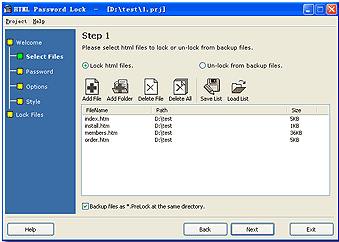
With the HTML Password Lock 4.6 you just have to carry out a simple sequential process of encrypting your webpage. It comes with a wizard style console, where the first step relates to the file/folder selection, saving and loading file list, along with creating backup file for safety. With the next step, the utility prompts you to choose the Single Password Mode or Multi User Password Mode. At this step, you can add desired user identities or set the program to auto-create them, in addition it also supports finding, saving and loading users. Now moving ahead to further step, the wizard presents the Options relating Protection Type, action when incorrect password is entered, specify html charset, and other advanced features. Coming to the fourth step, you can choose a style for customizing the layout of login page, which can even be edited and previewed, if required. When you’ve selected the style, the final step allows locking the files with password protection according to specified configurations. Moreover, the application also allows you to unlock the protected files.
HTML Password Lock 4.6 provides you with uncomplicated step-by-step procedure for adding password protection to your desired website, webpage or HTML page. For its capability to restrict access to the web pages by encrypting them, along with the impressive range of easily-usable features, the utility’s been awarded 3.5 rating points.
User comments