

Free Downloads Center
e.g. Video LightBox 1.0

Latest Reviews

Vitascene Starterkit

Vitascene Starterkit
Vitascene Starterkit is a professional tool that allows to manage and enhance the effects and transitions of images.

eCover Engineer

eCover Engineer
eCover Engineer, the professional tool that allows you to create outstanding eBook covers, CD covers, DVD covers and software box covers.

Subscribe

Video LightBox 1.0 Download

Editor's rating  
Users' rating   (1 votes) Rate it!
License Freeware / $0.00
Downloads 518
Publisher Vista-Buttons.com
File size 6660K
Date added 31-Jul-2009
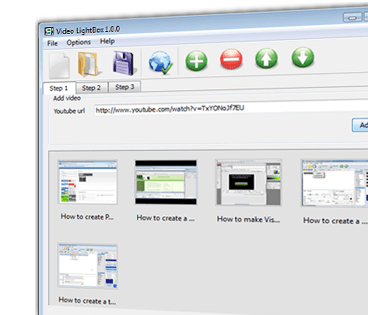
Video LightBox screenshot

Enlarge screenshot

Publisher's description
Editor's review
Submit your review

Video LightBox JS is a free wizard program that helps you easily
add video to your website or blog, in a few clicks without writing a single line of code.

All it takes is 3 easy steps: 1.Add Video, 2.Select Template, 3.Publish.
At the first step, you add a video clip, for example cut-n-paste
YouTube url, then select the template for video and video thumbnail
appearance and, at the final step, publish the result to a local drive
or directly to the Internet via a built-in FTP client.

Video LightBox generates a nice image thumbnail for your clip. On
click, this thumbnail expands into a stylish overlay window containing
the video. No css, html, javascript coding, no image editing, just a
couple of clicks to get the your video added to the Web!

Editor review: Reviewer, 2009-09-16 10:09:00

Video LightBox JS is a free wizard program that helps you easily add video to your website or blog, in a few clicks without writing a single line of code.

Features: Video LightBox JS is a free wizard program. A utility that lets you add video to a website. Be it a commercial one or a personal blog. Adding the video is in simple 3 step process. Choose a video to be added, choose a template and then just publish it. It is as simple as that. Adding the video clip by cut- and paste of a YouTube URL, for example is possible. You then need to select a template for video pop-up and decide the appearance of the video thumbnail. You can publish the result to a local drive initially or get the content FTPed to your site directly.

The application will generate a decent thumbnail for the clip you are about to publish. When clicked on the thumbnail transforms into a overlay window that plays the video. There is no need to mess with CSS, HTML. Javascript etc. Adding videos from popular sources like YouTube, Metacafe, Vimeo or MySpace is simple. Video gallery themes are available, the video overlay comes up in a nicely rounded format. Adding of captions are possible. FTP is built in.

Overall: Quite an easy way to add videos to your website or blog.

Visit homepage of Video LightBox

Download Video LightBox 1.0


youtube get
get youtube
cut video
image cd drive
video now
template website
for window vista
css code
thumbnail in html
video website

Programs related to Video LightBox

Copyright © 2001-2009, Free Downloads Center.