


Editor's review
Creates professional vista, XP, MAC, glassy, metallic and colorful web buttons and DHTML pop-up menus in just a few clicks.
Pros: Web Button Menu Maker can help web designers create buttons to be used on a website. A range of templates are available that could used as the template on which to build the design. There are 19 categories of templates. Each of the designs follow a basic style. These include three categories of Vista style buttons and another three of XP style buttons. Other categories have variations on a basic color. Each category has 16 odd individual designs to choose from. MAC, glassy, metallic and colorful web button template are in the selection available. You can easily create button images with normal, mouse over and pressed states, design horizontal and vertical navigation bars, add DHTML pop-up menu to the web buttons without writing a single line of code.
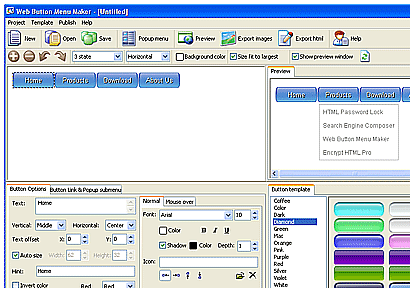
The user interface has a large display area with three floating menu pages again. One of these is the template selection menu page, another one is a preview page and the third is a settings page. Settings menu has two tabs one is the basic options like size, color etc. There’s a sub-page about text used and the font & color selections etc. Link& popup tab lets you select the pop menu, its direction, links, sub-menu etc. Text based page second tab defines the condition of text on mouse over. With the built-in export wizard web buttons in a variety of formats (GIF, BMP, JPG) can be exported. Saving of navigation code or insertion of the code into an existing HTML file can be done.
Cons: Even though it may not need much code to be written you must have a sense of what HTML code accomplishes and how. At a very minimal level how a site is organized and what causes navigation to be easy.
Overall a pretty nice package with a very simple interface. This is rated at 4 stars.
User comments