


Editor's review
DWG to PDF Converter is a standalone batch conversion utility to convert you DWG / DXF format to PDF format without need to AutoCAD software. It supports almost all version of DWG/DXF files such as R2.5/2.6, R9, R10, R12, R13, R14, R2000, R2002, R2004, R2005, R2006, R2007, R2008 and R2009 formats.
Features: Application has a simple user interface so that any one can easily work on the conversion process. You need to follow simple steps to complete conversion from DWG/DXF files to PDF files.
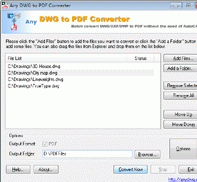
Click on "Add a File" button to add files which you would like to convert or click on "Add a Folder" button to include the files from a selected folder and its subfolders or you can drag files from Explorer and drop them to the list. You can see all added files in the files list. In the next step set options and specify output folder or file. Set option has different setting tabs for output size and colors, SHX and XRef Directories, Output Layout, Line Width (Pen Width) and PDF Properties. With output size you can set paper size as standard or custom, margin, output color, background color, PDF quality, output type as "One PDF per layout" or "All drawings combined into one PDF file" and "One PDF per drawing" and overwrite existing. With SHX and XRef Directories, you can add the SHX font directories and if the drawing has an XRef then add the XRef directories. Using output layout you can set model space, all layout, output by layout and all paper spaces. Set line width of your PDF document. Using PDF property you can enter the author, title, subject and keywords summary field for the PDF document.
Overall: It is a nice utility to quickly convert DWG/DXF files to PDF format files.
User comments