


Editor's review
PDF to AutoCAD Converter is a batch converter that allows you to batch convert your PDF files to usable and editable AutoCAD DWG or DXF files, so you can recover the entities in PDF to corresponding DWG entities easily.
Features: If you need to edit a drawing available with you as a PDF file, you are going to need a converter that can convert the PDFs back to drawings. It is a batch converter that allows you to batch convert your PDF files to usable and editable AutoCAD DWG or DXF files. You would be able to recover the entities in PDF to corresponding DWG entities easily. It provides you good quality, full featured operations that are easy to use. The program is standalone and does not require AutoCAD to be present on your machine. The program converts PDF to DXF format. DXF format is Drawing Exchange Format, and it compatible with many popular CAD systems such as AutoCAD, IntelliCad, etc.
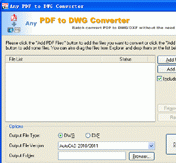
All the layers of the drawing are restored and it supports all the drawing entity types that include polylines, polygons and text etc. All the pages of a PDF file are converted. Embedded raster images can be extracted also. Batch conversion can handle thousands of PDF files at one time. The interface is simple and intuitive. First step in the process is to create a list of drawings. Major display area is provided for listing the files you have selected. The control buttons help you add and remove DXF files to the batch list. Once the batch is final, you need to specify a output file, you would be able to set some parameters too. There after it is just a single click to get the conversion done.
Overall: Quite neat and simple utility for conversion of PDFs to drawing files.
User comments