
 |
 |
|
|
 |
 |
 |
 |
|
|
Do you already have great bookmarks in your Favorites menu? Export them to a HTML page and publish it on the Net or send it to your friend! Bookmark Publisher will easily and quickly create such an HTML page.
How does it work?
1. Start the program.
2. Click the “Save as” button and specify the path where you want to save the file. Or click the “Open” button and see the file being created.
|
|
Editor review: Reviewer, 2007-09-04 08:20:00
Found some great websites and want to share them with your friends in a hassle-free way? Try Bookmark Publisher. This software makes it easy for you to export the bookmarks in your Favorites menu to a HTML page. It does this by quickly creating a HTML page with all your bookmarks as hyperlinks on it. Then, all you have to do to open those favorite pages of yours is click on the links on the HTML page. You can also publish this page on the Internet or email it to your friends.
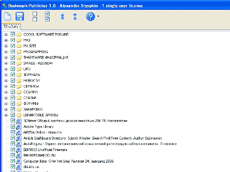
The software is also very easy to use. Once you install it, start the program and click on the floppy disk (save as) icon. Then, specify the file name for the HTML page and select the folder you want to save the page in. You can also click on the page (open) icon to see the page being created. Further, you can also create a page with only some of the bookmarks in your Favorites menu by clicking on the boxes next to the names of the links and folders in your Favorites menu to select the ones you want to publish on the Internet or send to your friends. You can select all the folders and links by clicking on the two checked boxes in the main toolbar or deselect all by clicking on the unchecked boxes in the toolbar. Moreover, the icon with two opposite facing arrows can be used to show the contents of all the folders in the favorites menu and the icon with the two facing arrows hide the contents of the folders.
Copying bookmarks or your Favorites menu cannot possibly get any easier than this. But, if you still get stuck somewhere, click on the question mark in the toolbar and you have help waiting for you. What’s more, once you register the software, you will enjoy lifetime updates of the Bookmark Publisher for free.
|
 |
 |
Visit homepage of Bookmark Publisher
Download Bookmark Publisher 1.04
Popular search terms related to Bookmark Publisher:
publisher, bookmark, publish, bookmarks, favorites, net, .net, export, button, open
|

start page publisher trial desktop publisher website publisher vista publisher microsoft publisher file bookmark html html button maker publisher to word export favorites

Programs related to Bookmark Publisher
WebReplay, a plug-in for Microsoft® Windows Internet Explorer®, designed for web professionals and quality assurance engineers allowing for advanced w...
BotDetect ASP.NET CAPTCHA is a website security component designed to protect your registration, comment, poll, guestbook, content submission, and oth...
SWF Decompiler is a new powerful SWF to FLA converter with functionality to decompile Flash movies, convert SWF elements into multiple formats and edi...
RSS editor, RSS generator - edit and publish RSS feeds and podcasts with ease! Create, edit and publish feeds via built-in FTP support. Add multimedia...
Bucket Explorer is a User Interface for Amazon's Simple Storage Service, S3. Amazon allows you to store data securely in folder like "buckets" on S3 f...
Asp Studio Professional is a powerful asp project development tool which integrated with ASP code editing and debugging. With no other asp server, yo...
A simple elegant slideshow.
Simply customized, designed and controlled.
XML driven.
Many animation styles.
Images preloader.
and more. ...
WMS Log Storage is a is a feature rich Windows Media Services log analyzer. The program generates HTML-based reports with tables and charts. Highly de...
Altova MapForce 2009 Enterprise Edition is a graphical data mapping, conversion, and integration tool. This award-winning application lets you map bet...
Prescient Author is a rapid application development tool for building dot NET applications.
Prescient Author captures the database table design and...
|