
Free Downloads Center
e.g. Bucket Explorer for Amazon S3 2009.04.03

Latest Reviews

Asterix and the Great Rescue

Asterix and the Great Rescue
Asterix and the Great Rescue is a fun and fanciful game suitable to all ages with an addictive game-play.

Proposalsmartz Proposal Writing Software

Proposalsmartz Proposal Writing Software
Proposalsmartz Proposal Writing Software is an handy application that allows you to work about smartly with your business proposals and documents.

Subscribe

Bucket Explorer for Amazon S3 2009.04.03 Download

Editor's rating  
Users' rating   (1 votes) Rate it!
License Shareware / $49.95
Downloads 432
Publisher Chambal.com Inc.
File size 28693K
Date added 10-May-2009
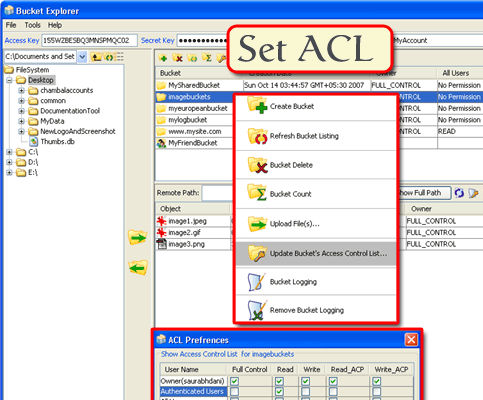
Bucket Explorer for Amazon S3 screenshot

Enlarge screenshot

Publisher's description
Editor's review
Submit your review

Bucket Explorer is a User Interface for Amazon's Simple Storage Service, S3. Amazon allows you to store data securely in folder like "buckets" on S3 for "pay only for what you use" price. Using Bucket Explorer, you can safely and securely store your files off-site on S3, access your files from anywhere, share your files with friends, or even share them with everyone.

You can use Bucket Explorer as a simple FTP tool or a backup tool for Amazon S3, it also works with Amazon S3 Europe (S3 EU for storing data in Europe). All you need to do is:
1. Create an AWS (Amazon Web Services) account at http://www.amazon.com/s3
2. Subscribe to the Simple Storage Service
3. Download and quickly install Bucket Explorer
4. Enter your Access ID Key and Secret Access Key from your AWS Access Identifiers page into Bucket Explorer fields to connect to S3
5. Create your buckets and upload, manage and share your files online on S3.
Why use Amazon S3?

-Your data is secure
-No minimum and over usage fee for data storage
-Use it as an "off site" backup
-Use it as a web hosting service
-Use it to share data with others

How does Bucket Explorer help?

-Browse your buckets and files on S3
-Upload and download files, to and from Amazon S3 buckets.
-Set Server Access Logging (Bucket Logging) for Audits.
-Synchronize data between multiple computers.
-Upload files in HTML format for Web Hosting.
-Create public URLs and signed URLs to share the files.
-Access shared buckets and files from someone else's account.
-Set Access Control on Buckets and Files for authorizing other
-Amazon users or non authenticated users with different access rights.

Useful Bucket Explorer links-

Try Now- http://www.bucketexplorer.com/be-download.html
Purchase- http://www.bucketexplorer.com/be-purchase.html
Free online support- http://www.bucketexplorer.com/be-support.html
Online demo- http://www.bucketexplorer.com/be-viewdemo.html?tour=bucketexplorer

Editor review: Reviewer, 2009-05-28 08:34:00

Bucket Explorer is a User Interface for Amazon`s Simple Storage Service, S3. Amazon S3 provides "pay only for what you use" secure on-line data storage service. You can use Bucket Explorer as a simple FTP tool or a backup tool for Amazon S3.

Features: Bucket Explorer provides a simple interface for users of Amazons S3 service. S3 or the simple storage service is a pay for use storage service provided by Amazon. With Amazon S3 you are able to store your data securely on folders like "buckets". Access is available from anywhere. You are able to share the files with family & friends. In fact you can even share them with anyone. The bucket explorer works as a FTP tool to the storage service. It can be used as a back up tool too.

Using the application is really simple. You need to subscribe to the Amazon web services or AWS first, subscribe to the storage service as well. You are then ready to download and install the bucket explorer application. Access id key and the secret access key for Amazon services needs to be entered into the bucket explorer fields so that they can be used for access. Creating buckets, uploading, managing and sharing becomes easy then on. You can use the service to synchronize data on multiple computers. Upload HTML format pages for web hosting. You are able to create public URLs and signed URLs to share the files. You can access shared buckets and files from someone else`s account. Logging can be set up for audit trail.

Overall: Nice and necessary utility for upload of the buckets into the storage service.

Visit homepage of Bucket Explorer for Amazon S3

Download Bucket Explorer for Amazon S3 2009.04.03


online backup
how to connect two computers together
best ftp explorer
ftp web server
web server http ftp
secure ftp server
ftp server simple
secure format
create ftp server
backup from ftp

Programs related to Bucket Explorer for Amazon S3

Copyright © 2001-2009, Free Downloads Center.