


Editor's review
Web Button Maker Deluxe helps you to make your website more attractive by jazzing up your buttons. You can make amazing and eye-catchy buttons with it,put different effects and customize them according to your choice.
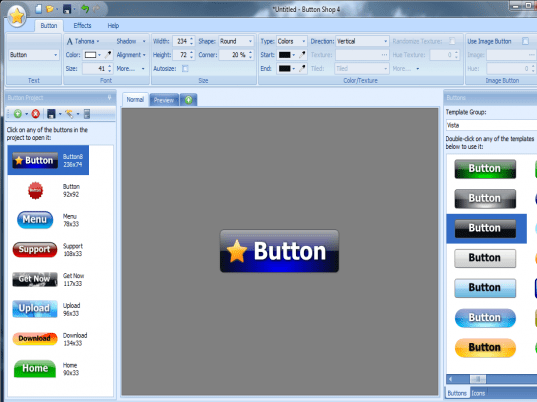
The software takes a little time to get downloaded. The first screen after starting the software looks gives an entertaining feeling. It has three options on the menu bar. You can start up with choosing the template for the buttons and select the skin to be Vista, Aqua, etc. It’s easy to assign text to these buttons and choose a color for it. While styling up the button you can set the alignment and the position of the text on the button. Choose the font size, style, effects and set the text on the buttons with selected outline. The width and height can be set and the effect will show up automatically. Select the increase and decrease level of the corners of the buttons. Choose from the varied template shown below the button skin bar to put a style to the button. Select the colors for the button and the direction of the button to be vertical, vertical center, etc. Set the color and level of light and glossy effects for the buttons. The button can be further customized with icon on it. To put an icon browse, select and set the alignment, position and transparency for it to place on the button. Add effects to the button from the given grayscale, pulsing and set the count and color to select glow and outer stroke. Then the final thing to be done is to save the button image for using it on the website.
The software has the ‘Help’ option to provide the detailed information. The software is fun to operate. It is quite entertaining to work with as you plan to make your website look more attractive.
User comments